Restore accidentally deleted partitions, fix damaged volumes and disks
Active@ Partition Recovery is a freeware toolkit that helps to recover deleted and damaged logical drives and partitions within Windows, WinPE (recovery boot disk) and Linux (recovery LiveCD) environments.
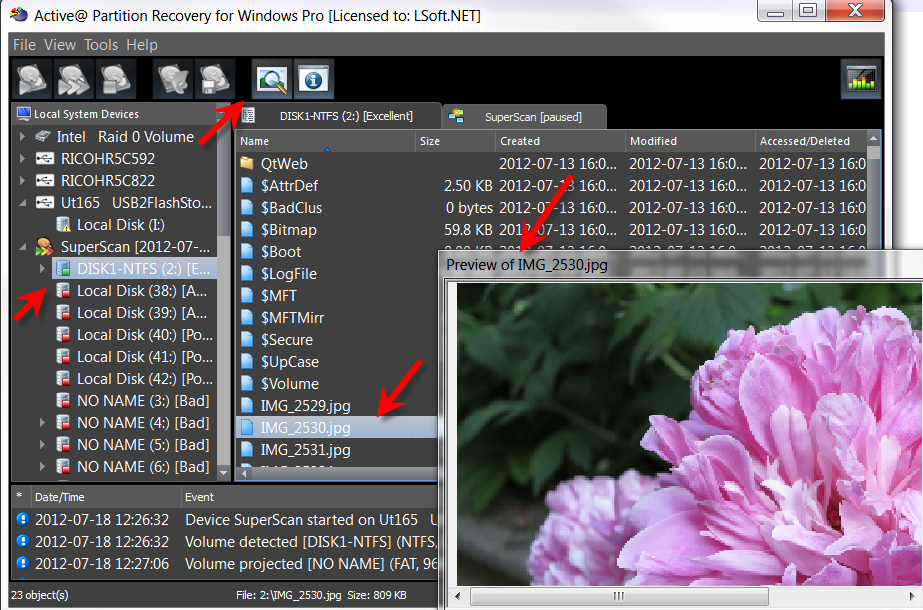
Simple QuickScan easily detects and recovers recently deleted partitions, as long as they were not formatted / overwritten to after deletion.
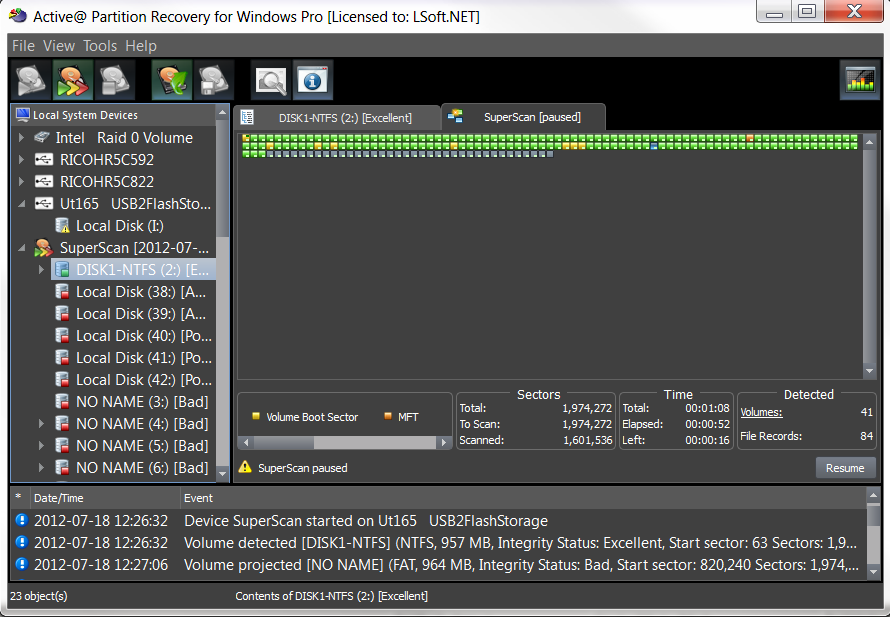
Advanced low-level SuperScan may detect partitions which were deleted a long time ago, even if you have created new ones and even formatted them.
Last Chance recovery method detects and recovers files by their signatures on volumes having severely damaged file systems, where physical volume recovery isn't possible! Recovers NTFS/ReFS, FAT/exFAT.
- Added new file signatures recovery: WEBM, SDOCX, HEIC
- Improved SuperScan - added option to ignore file properties to speed up scan
- Latest refactored recovery Kernel 15.10.28 includes many improvements
- The latest Linux Boot Disk based on openSUSE Leap 16
- Active@ Boot Disk upgraded to WinPE based on Windows 11 25H2 code base
Key Features
Recover partitions and disks
Restores lost partitions and disks back to working state
QuickScan for fast partition recovery
QuickScan easily detects partitions which are deleted but not re-formatted
SuperScan for low-level partition detection
SuperScan uses low-level scan process to detect re-formatted and damaged partitions
Last Chance recovery method
Last Chance technology helps with severely damaged filesystems on volumes
Rollback partitioning changes
Backup and restore disk partitioning info and ability to rollback changes
Fix vital disk structures
Fix damaged Partition Table, MBR (Master Boot Record) and GPT records
On-the-fly recovery
Performs partition recovery on-the-fly (no machine reboot is needed)
Manual mode for advanced users
Manual mode for the correction Volume Boot Sectors provided for advanced users
Unicode and long file names
Supports multi-language characters (unicode) and long file names
Recover to another location
Ability to recover all files and folders from disk images to another location
Recover most file systems
Recovers NTFS, ReFS, exFAT, FAT, HFS+, ApFS, UFS, XFS, JFS, Ext2/Ext3/Ext4 & BtrFS file systems
Supports all kinds of disks
Recovers SATA, eSATA, SCSI, SSD, NVMe disks, RAID disk arrays, USB Flash Disks and Memory Cards, external USB drives
Client Reviews
See what our clients are saying about Active@ Partition Recovery

I accidentally deleted the partition on whilst doing a fresh Win 7 installed on a new drive. Got confused with disk sizes and blew away the wrong partition. The drive was full of hundreds of GB of photos and videos. Active@ Partition Recovery is freaking awesome!! It worked a treat and we got it all back in a jiffy. This software is worth its weight in gold. Serious kudos to you guys. Brilliant software. So glad I bought it.
Stu, United Kingdom
I accidentally trashed the partition table of my backup disks, which held my only copy of all my data at the time. Your software was able to recover the partition table and save all of my data with no loss at all. I can't express how thankful I am. Worth it at ten times the cost.
Derrick Coetzee, Berkeley, California
Great software! Just saved me an evening of Exchange server rebuilding. For the record, it works on iSCSI SAN volumes in a Hyper-V cluster, too! Very cool.
Gregory Eytcheson, Independence, KS
This software rocks! I accidently changed the MBR on an exfat formatted drive. I knew everything was still there, but Easus and Acronis demos weren't showing me what I knew to still be there. I tried two or three packages before I stumbled on yours and yours was the only one that offered a simple solution. Partition Recovery identified everything correctly. Five minutes later all was restored. Thank you.
Jeff Baggett, Wisconsin, US

Pricing Table
Please choose the correct version and licensing model according to your business needs.
Standard
Windows application, Windows Installer
Licenses:
$
Professional
Plus Active@ Disk Editor, LastChance recovery, File Organizer & Copy All Data
Licenses:
$
Ultimate
Plus Active@ File Recovery, WinPE-based Boot Disk & Linux-based LiveCD to repair unbootable PCs
Licenses:
$
- Personal license - for non-commercial purposes. The Personal License will be assigned to the individual's name.
- Corporate license - for commercial use. With a Corporate License the company can use the program in a business, academic, or government environment.
- Unlimited license - Business license that provides unlimited worldwide licensing for corporation.